
The complete guide to state-aware dbt Orchestration | Orchestra dbt
How State-Aware Orchestration is the next evolution in running dbt

Introduction to dbt Orchestration
dbt core has been downloaded over 1 billion times. Over 30,000 organisations use dbt in production, the number grows every day. Around 5% of the install base have over 5,000 models.
While learning dbt is easy, maintaining it is not. Analytics Engineering is a new profession and with it there is more dbt code being generated than ever before — taming spaghetti lineage has become a full time job for many, and with AI rising faster than you can say “dbt run”, this problem only seems to be getting worse.
One key area of concern is scheduling. Where a simple daily “dbt run” suffices to begin with, as companies and data teams grow quickly, the dbt estate gets more complicated. Before long, models must be tagged in different ways such as “tag:hourly” or “tag:daily”, which quickly becomes difficult to maintain.
Furthermore, as many growth stage companies expand, monitoring and cleaning up old models can be painful. What should data engineers do with contacts_hubspot and opportunities_salesforce as the company migrates to contacts_new_ai_powered_crm? It is difficult to balance the needs of the business while retaining sanity within a dbt project.
This problem is not unique to growth-stage companies, either. Large enterprises who feel the pain of decades of technical debt may and “self-serve analytics” may observe that the estate of SQL models is simply too large, but that refactoring is not a plausible option.
One solution to this is state-aware orchestration for dbt or “SAO”. While dbt fusion already has an impressive 500+ Github Stars, the traction for dbt core is unparalleled. We wanted to help solve these gnarly problems for dbt practitioners in a way that finally contributed back to the dbt community.
In this guide, we’ll cover some common dbt FAQs
Common dbt FAQs
What is State-Aware Orchestration and what does it do?
Why State-Aware Orchestration matters for data teams
How dbt State-Aware Orchestration works
How to configure dbt State-Aware Orchestration locally
How to configure dbt State-Aware Orchestration in Orchestra
Managing state in Orchestra
Monitoring the impact of State-Aware Orchestration
By the end of this guide, you’ll be a certified dbt SAO practitioner!
Let’s dive in.
Want to get started? Check-out the resources below.
📚 Read the Docs
What does dbt State-Aware Orchestration do?
By default, dbt projects take a fairly unopinionated approach to transforming your data, with “run everything every hour and pray” being a popular approach to keeping analytics fresh within a business.
But, with time and scale, this translates into run times creeping up, larger warehouse instances, and days spent refactoring your projects.
Perhaps a better way would be to:
Transform the data that’s needed, when it’s needed
That’s where state-aware orchestration comes in.
Your orchestrator already sees everything that’s going on in your DAG, so tracking the state of each model — when it was last built, whether anything upstream has actually changed — is very much within its wheelhouse, and that information can be used to decide what needs building and what can be skipped entirely.
dbt freshness checks tell us when new data is available in our sources, but why not extend this to models? When is data available at the end of my pipeline?
Conversely, our stakeholders have processes designed around consuming that data, so why not ensure we’re updating those tables for when they’re needed? And why update them when they’re not needed?
This is state aware orchestration.
No new data? Don’t update that staging table, use it as is.
Upstream models haven’t changed? Neither will this one.
Daily mart table already built this morning? If a dbt model updates, and nobody’s around to use it…
Why does state-aware orchestration matter for data teams?
Faster, more predicatable, less computationally intensive job runs are an easy sell to any data engineering team, but where else do we gain by dbt’s saving?We’ll start with the headliner, then check out some other benefits.
Less reprocessed data
Not reprocessing the same data again and again is a clear win here, freeing up time in all services, reducing the amount of compute required each time, and ultimately taking the edge off the bills that keep Platform Engineers and Managers awake at night.
Incremental Improvements
Increments in dbt are extremely powerful, and one of the top ways to make a dbt project more efficient, but it’s not always a case of adding a simple Jinja block.
State aware orchestration doesn’t eliminate the need for them either, but rather than executing a huge query only to find out in the last filter that there’s actually no data to insert isn’t the most efficient use of your warehouse, whereas state aware would have skipped the query entirely. Although this doesn’t eliminate increments, it helps teams be more efficient with their dbt runs, before getting into the nitty-gritty.
Cleanup Days and Fire Drills
If you’re lucky enough not to have done this, congrats. When bills start edging up and it’s getting closer to the end of a financial period, dbt spend can be suspect number one for interrogation.
This results in teams setting aside hours or even days to “reduce spend” by combing through their project, deciding what to run when, where an increment can go, how to rejig the scheduling, etc.
State aware orchestration provides a bunch of that out of the box, meaning dbt runs are just more inline with the amount of data you’re receiving, processing what you need, and ultimately leading to less time spent combing your IDE.
Defined Deliveries
Even when you’re running an hourly dbt project with increments everywhere, sometimes you just have models that need running at given times to meet the needs of the consumer, or conversely, you’re running a model all the time for that Tableau dashboard referenced in a meeting once.
By bringing SLAs into your dbt project, state aware orchestration limits the need for “special runs for special data” or needlessly refreshing the enormous table nobody uses, which brings more predictability to dbt’s delivery times, and ultimately to those who use your data.
On top of this, the data function now has a data point that provides an alignment with another part of the business, and that’s a win-win.
But this is just our opinion, the proof is in the pudding, so why not try it out for yourself and see how state aware orchestration benefits your team?!
How does it work
There is a worked example in the docs, but let’s look at some common dbt scenarios you may encounter in your pipelines, and how they would look with state aware orchestration enabled.
Common Scenarios
No changes — The easiest scenario, all models and sources are stale, seeds and snapshots still run, triggering the
final_modeland reusing the existing model data.Source receives data and refreshes — A source refreshes and rebuilds its stage, but not all
dim_ordersupstreams refreshed, so it does not build.
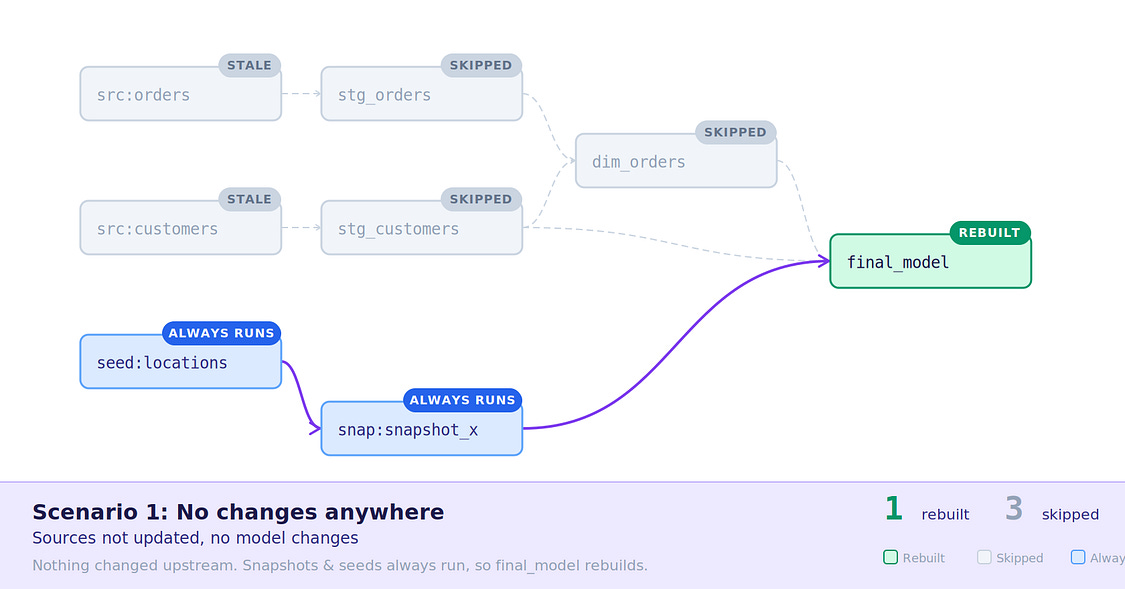
Scenario 1: Nothing to transform
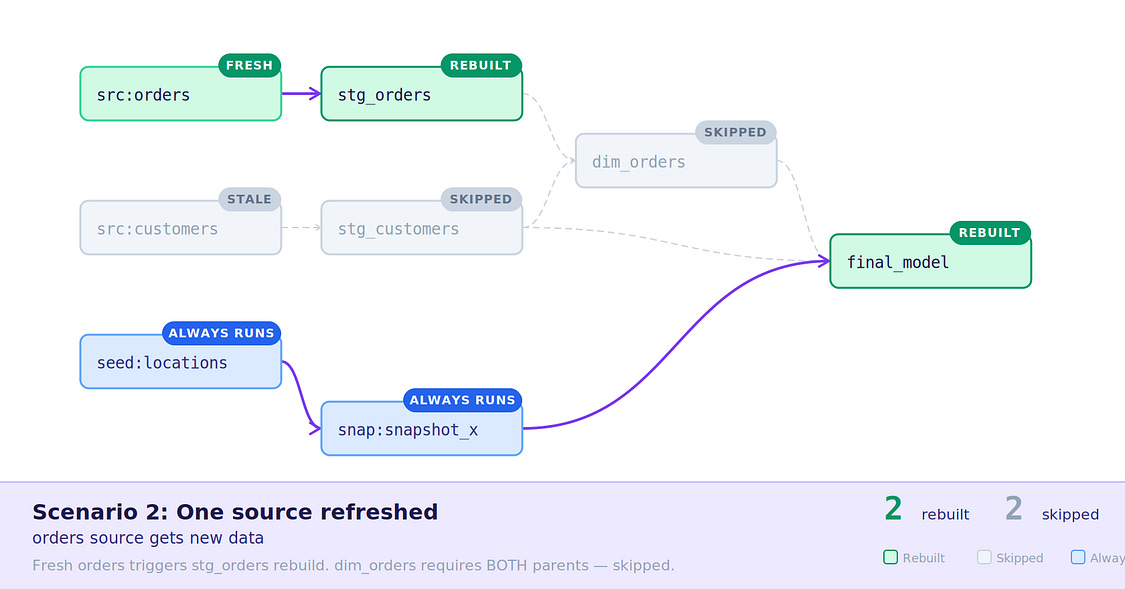
Scenario 2: Single source receives data
3. Model code changed — stg_customers had a code change, which may indicate new logic, so was rebuilt, along with the downstream final_model , dim_orders still skipped.
4. Orders source has new data, dim_orders within build_after SLA — The orders source received new data, but the inherited SLA of 1 hour from dim_orders tells stg_orders not to rebuild.
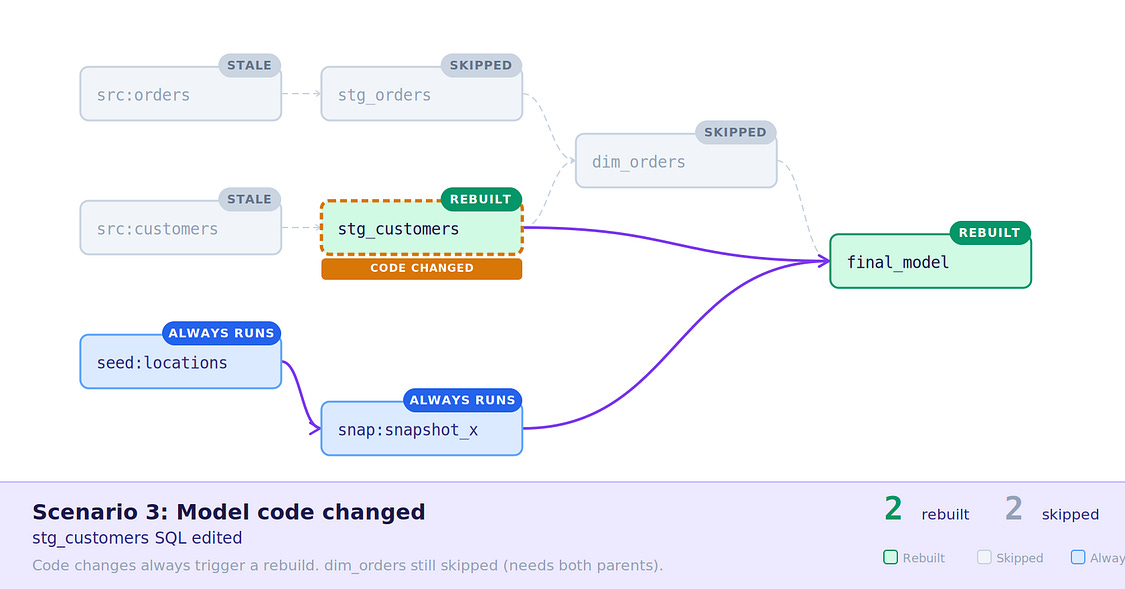
Scenario 3: Model code changed
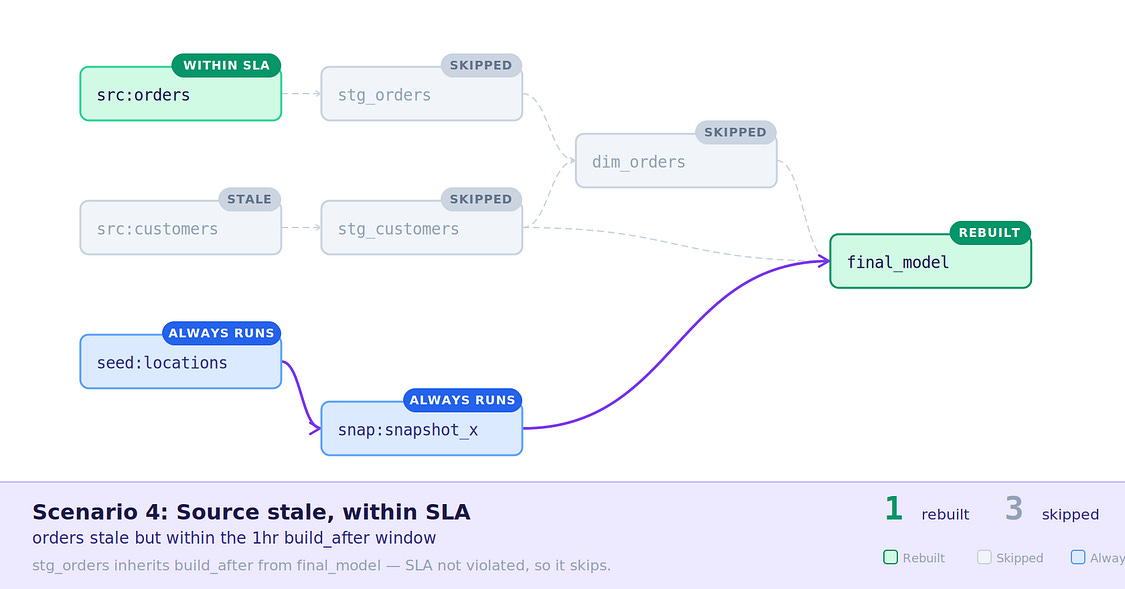
Scenario 4: New data with inherited SLA
5. Data is stale, SLA breached — Over 1 hours has passed since dim_orders last ran, no new data has been received, but models are rebuilt based on inherited SLAs.
6. Seed file updated — Seeds always run, behaves as usual.
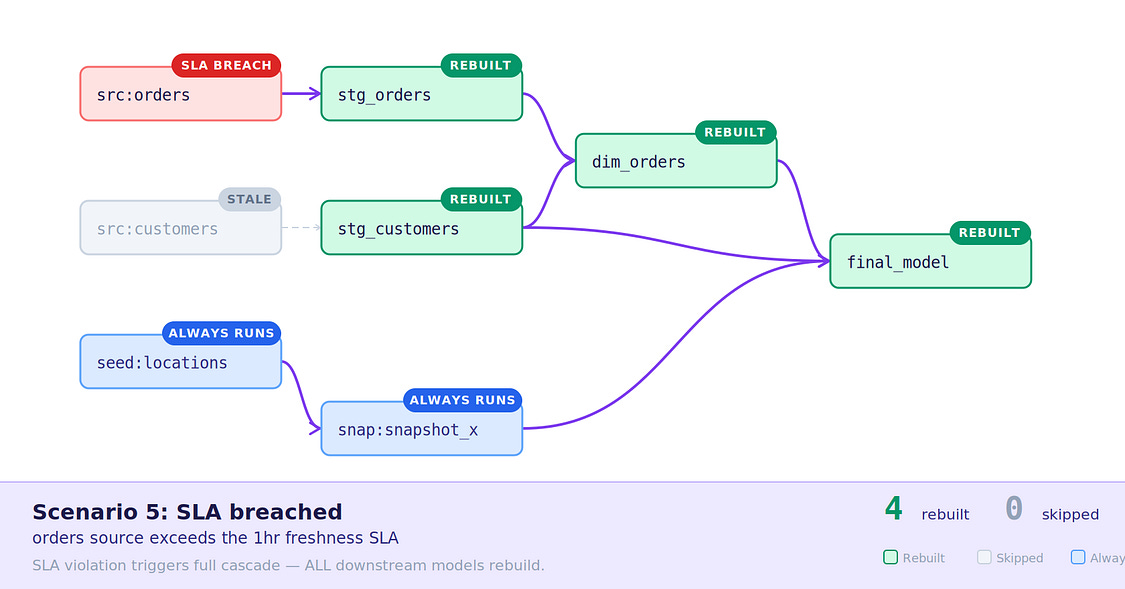
Scenario 5: Stale data but SLA has passed
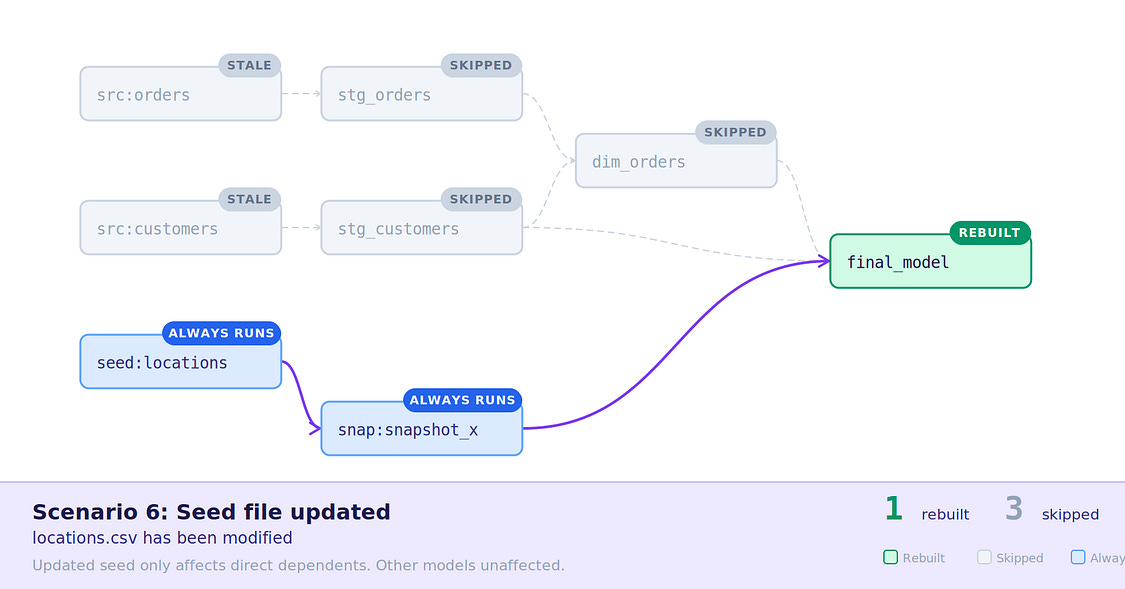
Scenario 6: Seed file update
7. Seed file unchanged, final_model outside SLA — Nothing happened to the seed, but final_model has passed it’s 1 hour SLA, so is rebuilt.
8. Seed file updated, final_model inside SLA — The seed file was changed and rebuilt, but final_model is inside it’s 1 hour SLA, so is not rebuilt.
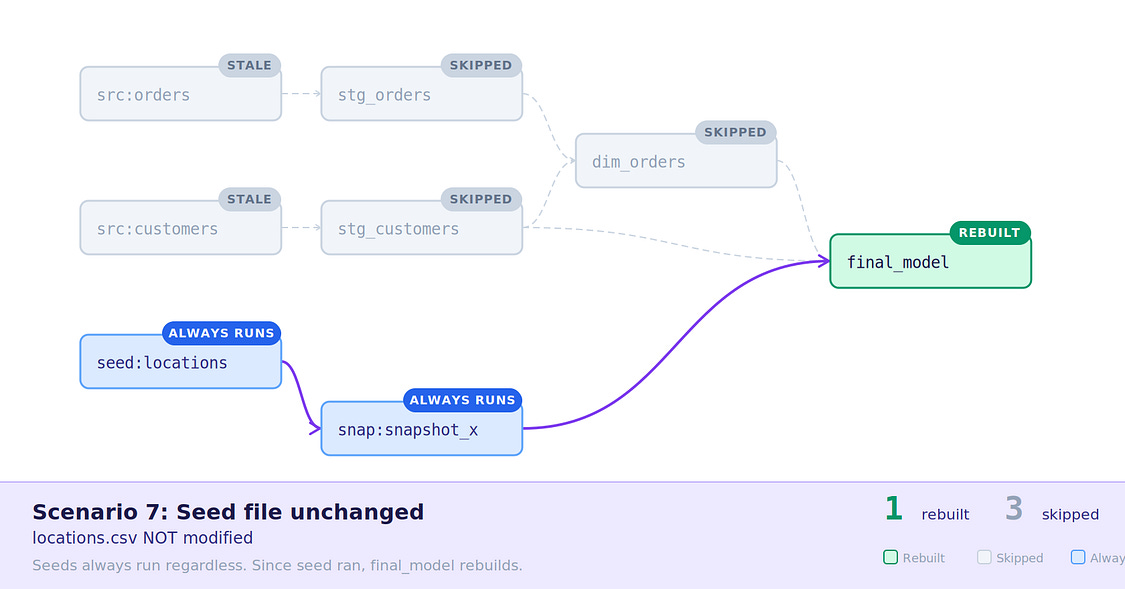
Scenario 7: Seed unchanged, final_model outside SLA
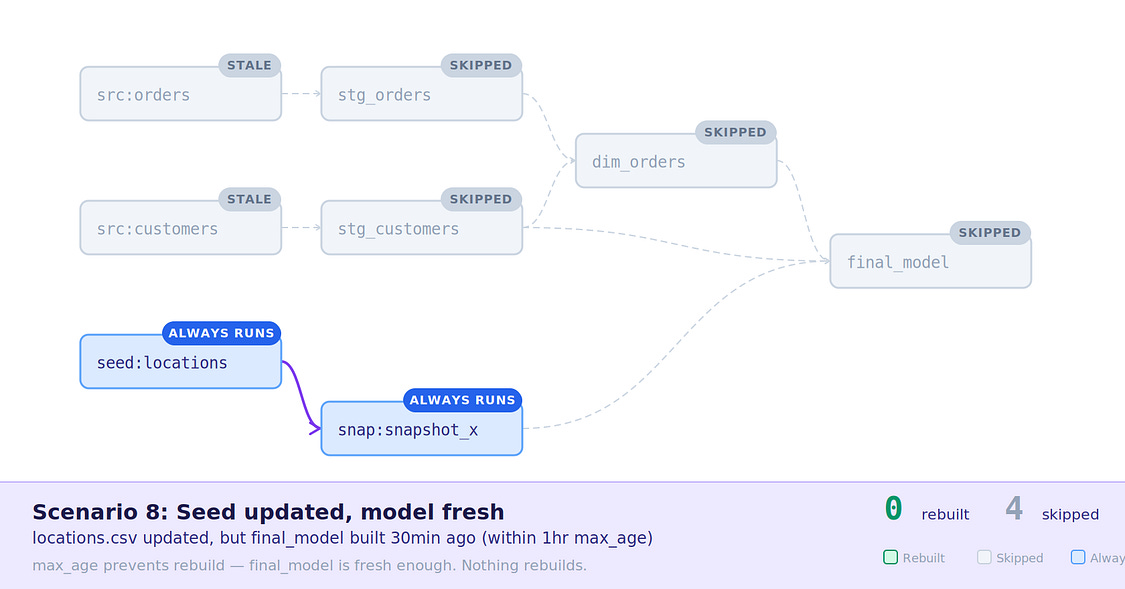
Scenario 8: Seed changed, final_model inside SLA
What about in Slim CI or with state:modified?
When running Slim CI or any state:modified style dbt command in Orchestra, you may be wondering how State Aware Orchestration might impact your builds?
Well, the short answer is, it doesn’t (mostly).
For the state comparison, Orchestra will still fetch the actual dbt artifacts from the run you wish to defer to, meaning the state comparison still happens in dbt all the same, and the difference as calculated as usual, so no updates are required here.
But, what if this is in CI, and we’re making commits after opening a change request?
As above, dbt will still be using the actual manifest.json to determine your changes, but when those are sent to built, Orchestra will compare the models from your branch to those it has a current state for, which will be those built from the previous commit, not production tables (as they’re stored with their full location, i.e. MY_CI_DB.PR_123.TABLE_NAME).
So, the above scenarios apply again, if the model code has changed, it will be rebuilt, otherwise Orchestra will try to reuse the data asset built in the previous CI run — there’s performance gains to be had there too!
Configuring it for yourself
Orchestra needs a few things from dbt to be able to run state aware orchestration, so let’s get those configured, this consists of:
Source Freshness (Required)
dbt Core Task Setting in Orchestra (Required)
Model Build After (Optional)
Source freshness config (Required)
Check-out how to configure source freshness here.
Likely the one you’ve seen before, or perhaps already have in your dbt project, this lives in your sources YAML under a freshness block, and is used to monitor when your source tables were last updated, compared to your defined expectations.
For this, our options are:
loaded_at_field — the timestamp column dbt inspects.
Sits on the table config, not inside the freshness block. Typically a metadata column such as _fivetran_synced for ingestion tooling, or a datetime like created_at or order_date for source-system data.
warn_after / error_after — tolerances for freshness.
Each takes a count and a period (minute, hour, day). Both are optional independently — you can set just one. Setting only error_after skips the warning and fails immediately once past the threshold.
filter — a SQL predicate applied before dbt evaluates the max timestamp. Useful for excluding soft-deleted rows that would skew the reading, i.e. filter: _fivetran_deleted = false .
loaded_at_query — replaces the default freshness check with a fully custom query. Must return a timestamp in the expected format.
Metadata-based freshness — on Snowflake, Redshift, BigQuery, and Databricks, you can omit
loaded_at_fieldentirely and let dbt infer freshness from the warehouse’s own table metadata. Platform-specific caveats apply
Full Example
So, to give a full example of this, we have a Fivetran-managed source syncing every 30 minutes:
sources:
  - name: my_source
    tables:
      - name: oil_data
        config:
          loaded_at_field: _fivetran_synced
          freshness:
            warn_after: {count: 30, period: minute}
            error_after: {count: 60, period: minute}
            filter: _fivetran_deleted = false
The thresholds here map directly to the ingestion schedule — one missed cycle warns, two missed cycles errors.
You can adjust these to match the actual SLA of the source: tighter for real-time feeds, looser for daily batch loads.
For non-critical sources, configuring only warn_after avoids hard failures.
Task setting on dbt Core (Required)
Once your dbt project has all the configuration it needs, it’s time to enable this on your Orchestra pipelines.
To do this:
Navigate to a dbt Core Task in Pipeline Edit mode
Open the Task Parameters window, and toggle on “Use state orchestration”
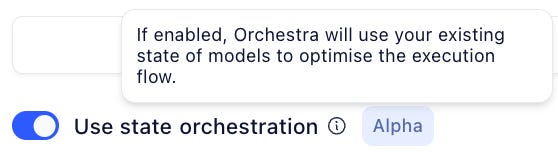
As simple as toggling it on, as it should be. YOU DO NOT NEED TO UPGRADE FROM DBT CORE TO ANOTHER PACKAGE.
That’s it!
Orchestra will now begin monitoring the state of the data assets in this task when the next run kicks off, and from then on, it’s a case of letting the magic go to work! ✨
build_after config (Optional)
To learn more about the build_after config, check out this article.
Source freshness covers your ingestion layer, but what about the models further down your DAG?That incremental staging model can run every 30 minutes just fine, but if mart_customers takes 5 minutes to build and the CRM team only pulls it twice a day, rebuilding it on every dbt run is just burning compute for nothing!
build_after lets you define model-level SLAs — a minimum time that must elapse before dbt considers rebuilding a model.
This sits within a model’s config.freshness block and takes three arguments:
count and period — the minimum time since the model was last built. period accepts minute, hour, or day.
updates_on — any or all. Controls whether the model rebuilds when any upstream dependency has new data, or only when all of them do.
The important thing to understand is that both conditions must be true simultaneously: the time window has elapsed and new upstream data is present. If either is false, the model sits tight and the existing table gets reused.
Let’s check out a worked example:
models:
  - name: stg_customers
    config:
      freshness:
        build_after:
          count: 2
          period: hour
          updates_on: any
- name: mart_customers
config:
freshness:
build_after:
count: 6
period: hour
updates_on: allstg_customers rebuilds after two hours as soon as any upstream has something new.mart_customers waits six hours and requires all upstreams to be fresh — a reasonable trade-off for an expensive full refresh that’s only consumed a couple of times a day.
One thing to keep in mind: build_after configs tend to sit towards the right-hand side of the DAG, but they have implications moving left. If mart_customers needs fresh data every six hours, everything upstream of it needs to be feeding it data at least that often — otherwise the window will arrive with nothing new to process.
Combined with source freshness, this gives you SLAs at both ends of the pipeline — the ingestion layer and the model layer — which is the foundation state-aware orchestration is built on.
Managing state in Orchestra
Here is how we manage state in Orchestra (docs).
Once state orchestration has been enabled on a task within a workspace, Orchestra will begin tracking the data assets as they’re built.
Mostly, this is going to be for dbt’s benefit, but sometimes we may want to peek behind the curtain and see what’s going on.
The Orchestra State
Orchestra manages this state at the Workspace level
In each workspace, Orchestra stores a minimal state of when each asset was last updated, where each asset is represented by its qualified location, i.e. database.schema.table, in most cases, like below.

Last update times of “model” in production and staging
This allows the different dbt pipelines in the same workspace to have a unified understanding of the state of a dbt model, so Pipeline A won’t try and update a model Pipeline B finished 2 minutes ago, unless specified.
Resetting State
But what if we want to do the equivalent of a “full refresh”?
Well, we’d either need to get Orchestra to ignore the state, or delete the state itself, which is as follows:
Navigate to State Management in Orchestra, via Settings > Workspace > Asset management
Here, you can see how many models are currently being tracked.To reset state, click the Purge state button. The next run will rebuild all models.
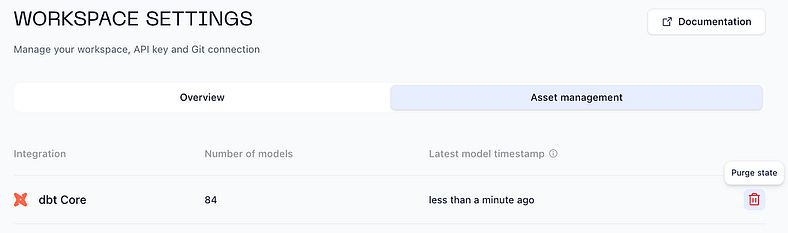
Purging dbt state for a workspace
After doing this, any dbt pipelines in the workspace will begin rebuilding all of their models from scratch on the next run.
If this was just for one dbt pipeline in the workspace, it would be equivalent to running with --full-refresh .
Exploring dbt Metadata
Orchestra Assets already contains information from monitoring all your data assets, and state aware orchestration enriches that with further details about the asset state.
Navigate to Assets in Orchestra
Search for one a model, i.e.
dim_orders
Which will lead to 2 tabs containing rich details about the asset, as in the display below.
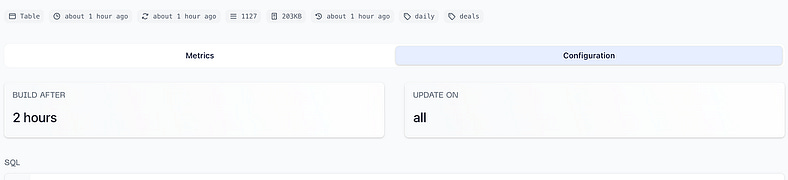
Summary data for a table in a state aware dbt pipeline
Metrics tab — Analytics related to this asset, and the latest operations and pipeline runs linked to it, useful for quickly seeing when and how an asset was last materialised
Configuration tab — dbt-specific configuration collected for this asset, such as its freshness configuration, SQL, and associated tests
Extra Debug Logs
Sometimes it’s more useful to inspect a particular job or run, for this it’s possible to enable additional logging for debugging.
Enabling this is simple, just update your dbt task to run with the environment variable ORCHESTRA_DBT_DEBUG=true .
Monitoring the impact of state-aware orchestration
The impact of state-aware Orchestration can be put into three buckets.
Fresher Data
Saved costs
Saved time
Let’s deal with these in turn.
Saved Time
Before State-Aware Orchestration
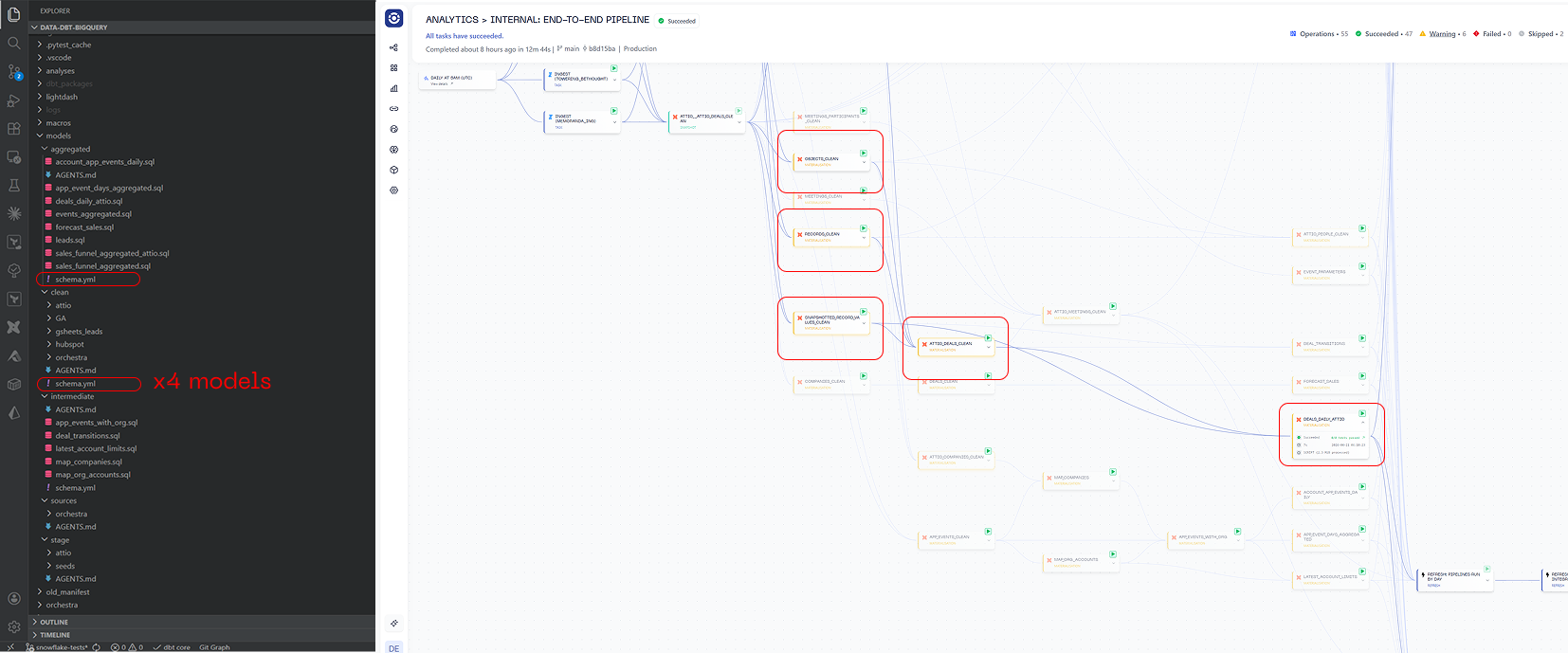
Let’s suppose you have a small dbt project that starts out as a single dbt build once a day.
Over time this turns into a thousand model behemoth with dozens of different tags. Taking an example below, if you want to change the schedule for the DEALS_DAILY_ATTIO table you will need to edit two schema.yml files and 5 models.
After State-Aware Orchestration
With State-Aware Orchestration in Orchestra, you only need to be make one code change.
sources:
  - name: raw
    schema: raw
    tables:
      - name: src_orders
        config:
          freshness:
            warn_after: { count: 24, period: hour }
          loaded_at_field: order_date
      - name: src_customers
sources:
- name: raw
schema: raw
tables:
- name: src_orders
config:
freshness:
warn_after: { count: 24, period: hour }
loaded_at_query: “select max(order_date) from table where order_date > dateadd(DAY, -7, current_date())”
- name: src_customersYou should evaluate how long your team spends tweaking schedules and orchestrating dbt and assign a value to it.
Fresher Data
Before State-Aware Orchestration
dbt runs on separate schedules; some processes run daily and some may run hourly. This means that if anything lands in between the fifteen minute and hourly runs, data gets stale. If an hourly process fails, stakeholders need to wait another hour to get data.
After State-Aware Orchestration
dbt runs every fifteen minutes or perhaps even more frequently at a scheduling frequency. The data is processed as soon as it arrives. Transformations take time; each model has a processing duration (the time it takes to process the model). This means that the freshness lag equals the scheduling frequency + processing duration, greatly simplifying the formula for data freshness.
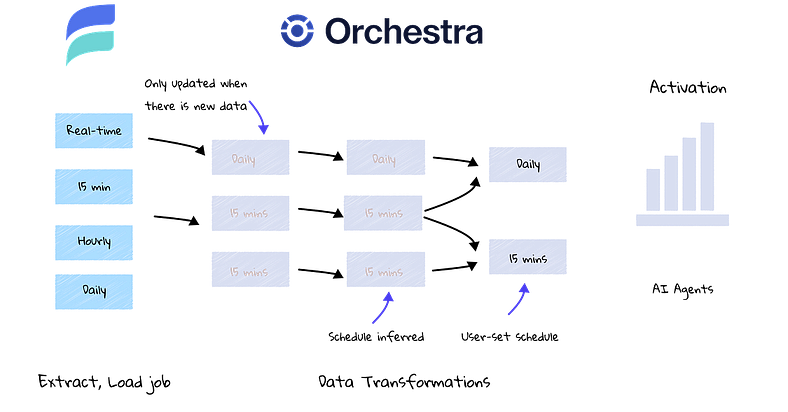
How Orchestra and Estuary make activation faster
In the example above, we can see that different data feeds from a real-time streaming too like Estuary result in data landing in a data warehouse environment. Rather than scheduling separate dbt jobs, dbt simply runs on a regular cadence, processing data as it arrives.
You should evaluate the benefits of fresher and more reliable data, as well as the potential gains to stakeholder trust from implementing SAO.
Reduced cost
We save the best until last! With Orchestra SAO, you can reduce data warehouse costs substantially in the correct conditions.
Best Case Scenario: many unused sources, many schedules, minimal SLAs.
Before State-Aware Orchestration, the company runs everything hourly. This results in 1,000 model builds an hour an 24,000 builds a day.
Minimal SLAs: It turns out that key models only need to be run daily. Build_after configurations are added to models. This reduces the number of hourly models from 1000 to 500.
Many schedules: data lands in the day at different times. By running everything hourly, everything gets picked up, but models are run unnecessarily. By moving to SAO, an additional 100 models are skipped in every hourly run.
Unused sources: it turns out that there are many sources that are not updated. These relate to an incremental 200 additional models every hour.
Result: the hourly job remains, but only 200 models run each time. Once a day, there is a a run of 500 models. This results in 23*200 + 500 = 5,100 model runs vs. 24,000 previously. Assuming an even distribution of models and serverless compute under-the-hood, this will reduce costs by over 75%
Worst Case Scenario: regular, reliable, infrequent data
Before SAO, data lands daily and regularly. It is reliable and almost never breaks. A single dbt build is run once a day, and it rarely fails. There are no plans to change the structuring or scheduling of dbt jobs.
After SAO, this will remain broadly the same. Adding in build_after configurations is unlikely to impact an already-infrequently running pipeline. Data is always fresh when it is processed, so this aspect does not change either.
However, what SAO opens up is the possibility of going faster. What would the Data Function be able to do if they didn’t need to promise only daily data? What if they could promise more or less real-time data?
How to find the reduced cost using the Metadata API
Using the Orchestra Metadata API, we can fetch and analyse the improvements in both the duration of tasks and warehouse cost savings. To get started, review our ‘blueprints’ GitHub repository, and follow the instructions in the README provided.
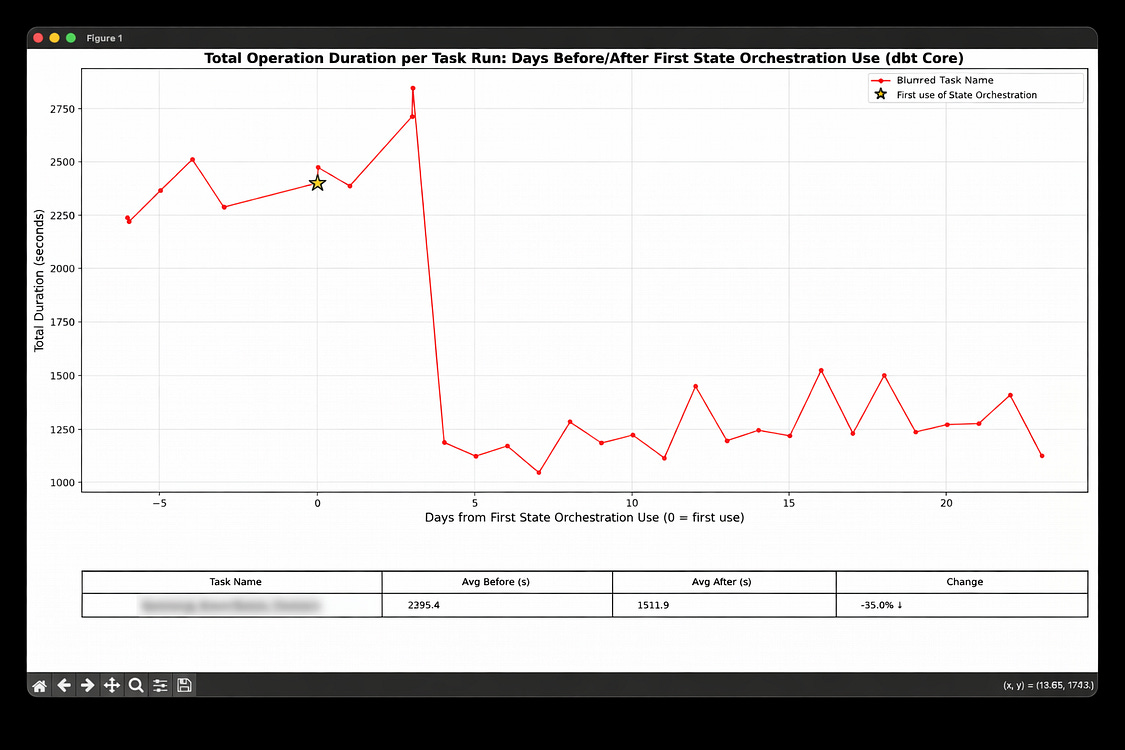
Reductions in cost from Orchestra SAO
Next Steps for SAO
Congratulations! You’ve completed our guide on SAO. You learned:
What is State-Aware Orchestration and what does it do?
Why State-Aware Orchestration matters for data teams
How dbt State-Aware Orchestration works
How to configure dbt State-Aware Orchestration locally
How to configure dbt State-Aware Orchestration in Orchestra
Managing state in Orchestra
Monitoring the impact of State-Aware Orchestration
In terms of helpful resources, we recommend getting started with what’s below:
We can’t wait to see what you build!
Orchestra Team