
Without Data Architecture AI is doomed
But with it, jesus christ it's good

Introduction
Recently we’ve been hearing tales of data teams building crazy systems with AI that can fix pipelines in real-time.
Turns out that these don’t have to be all that crazy. At least, not crazy complicated. They are getting crazy good.
However, it’s at an immense complexity cost. And boy oh boy do we as engineers love complexity. Stitching together scores of MCP servers, internal documentation services, memory, agents, and so on is done to create agents that can do some work.
And even then, key components like interactivity, audit, governance and extensability are missing.
Kevin in data is busy building his perfect agentic data engineer. But noone else can use it, or benefit. Kevin just sits away crafting AI kevin.

That said, we are close to getting something pretty easy to use and extensible, provided that the tools you’ve chosen allow you to build the different components below.
In this article I want to show you how you can use Orchestra or any other orchestration tool alongside Claude Code to easily debug your pipelines, and even fix and test them.
We’ll see that there are a bunch of core components:
Metadata and lineage
Access to code and pipelines as code
CLI and MCP (or at least, an API)
Governance and access
Modern tools make these a breeze but legacy archtiecture can make it challenging. Let’s go and see why.
Giving Claude Metadata
The most important thing Claude needs to have is metadata.
Without metadata, Claude won’t know what to do.
Important fields
Task durations
Task error messages
Lineage between Tasks and data assets
Asset history / history of tables
logs
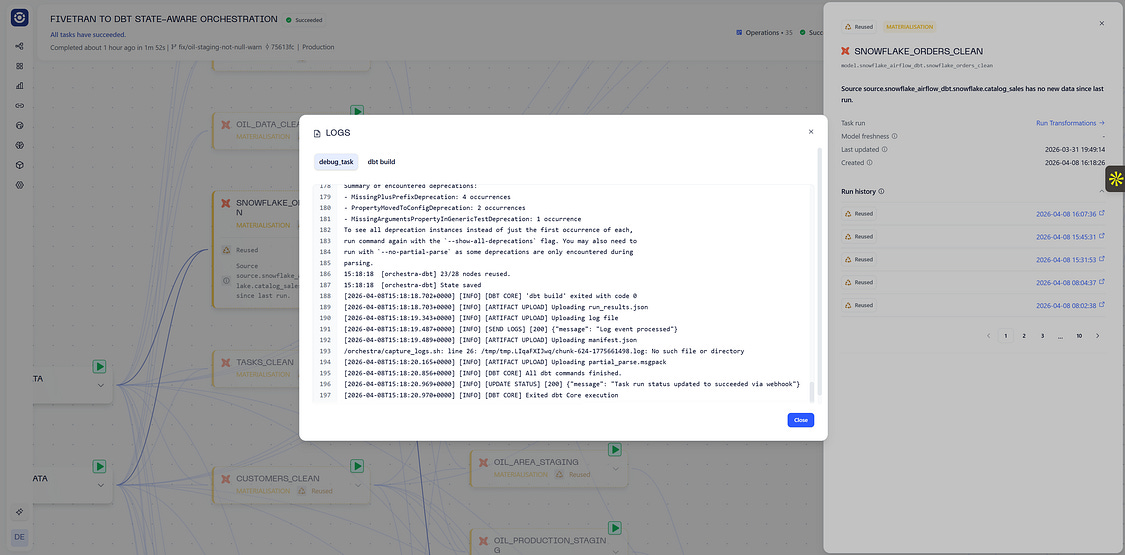
An example of using metadata you should have available
It should go without saying that this information should be available via API. Ideally, you have an MCP Server as well that allows agents to easily interact with the API.
This will give your AI the context it needs to understand what is going on!
The Apache Airflow method
Let’s say you are using an orchestrator like Airflow, you can take advantage of their REST API. They have an MCP Server too. If you have many instances, then you will need to manage many JWT Tokens and manage many MCP servers.
Giving Claude Power: CLI tools
There is an argument to say that agents require CLI tools instead of MCP Servers.
The argument goes like this:
Agents need to know how to interact with APIs
An MCP Server is a big blob of text explaining how to interact with every API endpoint
This is a lot of context, and therefore a lot of tokens
A lot of this is unnecessary. Why pass in the context of an entire API when you’ll only need a couple of endpoints?
A skill or directive could just say “Hey when you need to do X execute CLI command Y”
Even better; Agents should just know how to use common CLI tools
This makes agents faster, cheaper and more reliable
I found these blogs helpful
Having a CLI tool is therefore likely a non-negotiable. Fortunately Orchestra has one of those too.
Giving Claude Reliability: Skills
This is the fun part.
You thought giving AI the non-deterministic keys to your castle would be fun. You thought Claude would use the front door key and come in through the front door. Instead sometimes Claude does that, sometimes it takes a hammer and crashes through your window, and other times it jams the front door key so hard into the back door it manages to break an entry.
A skill, really, is very simply put, a set of instructions. Here is an example of how one fixes a data pipeline in Orchestra.
---
name: fix-and-rerun-pipeline
description: Given a failed Orchestra pipeline run ID, this skill automates the full workflow of diagnosing the failure, applying a code fix on a new GitHub branch, and re-running the pipeline on that branch.
---


## Steps

### 1. Get pipeline run status
Use the Orchestra MCP `get_pipeline_run_status` tool with the provided pipeline run ID to confirm it has failed.

### 2. Get task runs to find root cause
Use `list_task_runs` filtered by the pipeline ID to get all task runs for the failed run. Identify the FAILED task(s) and read the `externalMessage` field for detailed error output (e.g. dbt logs, stack traces). Note any SKIPPED tasks — these are downstream victims of the failure, not the root cause.

### 3. Diagnose the failure
Analyse the error output to determine:
- **Is it a code issue?** (e.g. dbt test failure, broken model, bad SQL) → proceed to fix in GitHub
- **Is it a tool/infrastructure issue?** (e.g. Fivetran sync error, connection failure) → surface the relevant platform URL using the `platformLink` or `connectionId` from the task run, and stop here

### 4. Fix the code in a new GitHub branch
If the failure is a code issue:
- Find the GitHub token in env vars (`GITHUB_TOKEN` or `GITHUB_API_TOKEN`)
- Fetch the relevant file(s) from the repo via GitHub API (`GET /repos/{owner}/{repo}/contents/{path}`)
- Apply the minimal fix needed. Examples:
  - dbt `not_null` test failing due to NULLs in data → change severity to `warn` with `warn_if: “>= {failure_count}”` rather than removing the test
  - Broken SQL → fix the model
- Get the SHA of the main branch HEAD (`GET /repos/{owner}/{repo}/git/ref/heads/main`)
- Create a new branch: `POST /repos/{owner}/{repo}/git/refs` with ref `refs/heads/fix/{short-description}`
- Commit the fix: `PUT /repos/{owner}/{repo}/contents/{path}` with the new content, file SHA, and branch name

### 5. Re-run the pipeline on the new branch
Use the Orchestra MCP `start_pipeline` tool:
- `alias`: the pipeline ID (UUID)
- `branch`: the new branch name created in step 4

### 6. Poll until completion
Repeatedly call `get_pipeline_run_status` with the new pipeline run ID until the status is no longer `RUNNING` or `CREATED`. Report the final status and surface the Orchestra UI link:
```
https://app.getorchestra.io/pipeline-runs/{pipeline_run_id}/lineage
```

## Notes
- GitHub token is in env var `GITHUB_TOKEN`
- Pipeline runs are triggered by pipeline ID (UUID), not alias
- The `branch` parameter in `start_pipeline` overrides the branch for the entire pipeline run
- Always prefer fixing tests with appropriate severity/thresholds over removing them
- If the pipeline is paused, `start_pipeline` will return a 400 — ask the user to unpause it in the Orchestra UI and retry
Obviously this can be cut down a lot, as each skill requires context. But this is what makes agent frameworks like Claude reliable.
The Claude skill is just a markdown file. It just has to be stored very specifically.
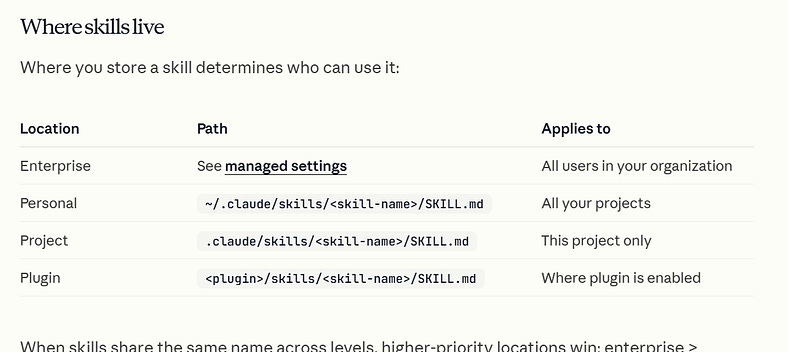
Where Claude Skills live
Note the skill file itself must be called SKILL.md
Giving Claude reliability: interactivity
This is perhaps, the most nuanced element of working with agents.
Agents are like interns. With the good ones, you give them some instructions, they go and smash out 80% of the task, and then they ask you a question.
Now — you can ask agents to one-shot things. But ask yourself, “Would I ask my intern to one shot something?”. The answer is “Probably not”.
This is where the terminal comes in handy. The terminal provides an easy way to provide this interactivity to your agent.
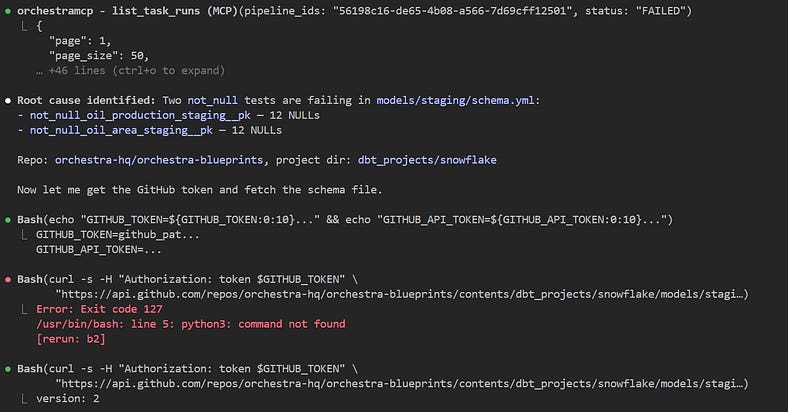
Interactivity
This means that when you’re running your agent as an async process, you should ideally be able to host it behind some kind of server so that it can be communicated with.
This in turn leads to the concept of sessions. A session refers to a specific set of interactions with the same context, history, task goal, and set of interactions. Every session is essentially an interactive invocation of your agent.
It is in some senses, optional. After all, you could ask Claude to one-shot things, but generally speaking a massive barrier to AI is reliability and trust — which means getting things to one-shot Tasks not the way you want is not a popular choice.
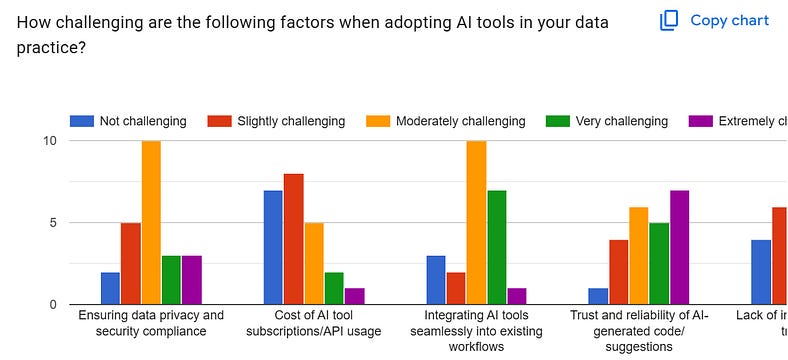
Trust and reliability are extremely challenging as a factor for adopting AI tooling. Source: internal research
Therefore, creating this interactivity offers a way to get around this.
Example: creating a pause/continue agent session in Fast API with Anthropic
Here’s a complete FastAPI example that uses Anthropic’s async Python client and implements a real pause / continue agent loop.
It works like this:
POST /sessionscreates a conversationPOST /sessions/{session_id}/messagesends a user message to the agentthe agent can either:
return a normal answer, or
call a
pause_for_humantool, which makes the server save a checkpoint and returnstatus: "paused"POST /sessions/{session_id}/continuelets a human send another message like “continue” or add more instructions, and the agent resumes from the saved state
That pattern fits Anthropic’s model well because the Messages API is stateless, so your app is expected to persist conversation history and resend it on each call. Anthropic’s docs also describe the client-tool loop: Claude can stop with stop_reason: "tool_use", your app executes the tool, and then sends back a tool_result. FastAPI recommends async def when you’re awaiting async libraries
import os
import uuid
from typing import Any, Dict, List, Literal, Optional

from fastapi import FastAPI, HTTPException
from pydantic import BaseModel, Field
from anthropic import AsyncAnthropic

# -----------------------------------------------------------------------------
# Config
# -----------------------------------------------------------------------------

ANTHROPIC_API_KEY = os.getenv(”ANTHROPIC_API_KEY”)
if not ANTHROPIC_API_KEY:
    raise RuntimeError(”ANTHROPIC_API_KEY is not set”)

# Use any supported Claude model you prefer.
ANTHROPIC_MODEL = os.getenv(”ANTHROPIC_MODEL”, “claude-sonnet-4-5”)
MAX_TOKENS = int(os.getenv(”MAX_TOKENS”, “1200”))

client = AsyncAnthropic(api_key=ANTHROPIC_API_KEY)

app = FastAPI(title=”Anthropic Pause/Continue Agent”, version=”1.0.0”)

# -----------------------------------------------------------------------------
# In-memory store for demo purposes
# Replace with Redis/Postgres/etc. in production.
# -----------------------------------------------------------------------------

class SessionState(BaseModel):
    session_id: str
    history: List[Dict[str, Any]] = Field(default_factory=list)
    status: Literal[”idle”, “running”, “paused”, “completed”] = “idle”
    pause_reason: Optional[str] = None
    checkpoint_id: Optional[str] = None


SESSIONS: Dict[str, SessionState] = {}


# -----------------------------------------------------------------------------
# Request/response models
# -----------------------------------------------------------------------------

class CreateSessionResponse(BaseModel):
    session_id: str
    status: str


class UserMessageRequest(BaseModel):
    message: str


class ContinueRequest(BaseModel):
    message: str = “continue”


class AgentResponse(BaseModel):
    session_id: str
    status: Literal[”completed”, “paused”]
    output_text: Optional[str] = None
    checkpoint_id: Optional[str] = None
    pause_reason: Optional[str] = None


# -----------------------------------------------------------------------------
# Anthropic tool schema
# -----------------------------------------------------------------------------

PAUSE_TOOL = {
    “name”: “pause_for_human”,
    “description”: (
        “Pause execution and wait for a human/API caller to continue later. “
        “Use this whenever you need approval, clarification, additional data, “
        “or when you want to explicitly stop and let the caller resume the task.”
    ),
    “input_schema”: {
        “type”: “object”,
        “properties”: {
            “reason”: {
                “type”: “string”,
                “description”: “Why the agent is pausing.”
            },
            “summary_for_human”: {
                “type”: “string”,
                “description”: “A short summary of where the agent stopped.”
            }
        },
        “required”: [”reason”, “summary_for_human”]
    }
}


# -----------------------------------------------------------------------------
# Helpers
# -----------------------------------------------------------------------------

SYSTEM_PROMPT = “”“
You are an API-driven agent.

You can do two things:
1. Answer normally if you can complete the task now.
2. Call the pause_for_human tool when you want to stop and wait for a human.

Use pause_for_human when:
- you need approval,
- you need more information,
- you want to hand off control back to the caller,
- or the caller explicitly asks you to stop and continue later.

When the user later says “continue”, resume from the prior context and complete the task.
Be concise but useful.
“”“.strip()


def extract_text_from_response(response: Any) -> str:
    parts: List[str] = []
    for block in getattr(response, “content”, []):
        if getattr(block, “type”, None) == “text”:
            text = getattr(block, “text”, “”)
            if text:
                parts.append(text)
    return “\n”.join(parts).strip()


def find_tool_use_block(response: Any, tool_name: str) -> Optional[Any]:
    for block in getattr(response, “content”, []):
        if getattr(block, “type”, None) == “tool_use” and getattr(block, “name”, None) == tool_name:
            return block
    return None


async def run_agent_turn(session: SessionState) -> AgentResponse:
    “”“
    Runs one Anthropic turn with the full saved history.
    If Claude calls pause_for_human, we checkpoint and return paused.
    Otherwise we return completed with text.
    “”“
    session.status = “running”

    response = await client.messages.create(
        model=ANTHROPIC_MODEL,
        max_tokens=MAX_TOKENS,
        system=SYSTEM_PROMPT,
        tools=[PAUSE_TOOL],
        messages=session.history,
    )

    # Save assistant content exactly as returned so the conversation remains valid.
    assistant_message = {
        “role”: “assistant”,
        “content”: [block.model_dump() for block in response.content]
    }
    session.history.append(assistant_message)

    pause_block = find_tool_use_block(response, “pause_for_human”)
    if pause_block is not None:
        tool_input = getattr(pause_block, “input”, {}) or {}
        reason = tool_input.get(”reason”, “Paused by agent”)
        summary = tool_input.get(”summary_for_human”, “Agent paused”)

        checkpoint_id = str(uuid.uuid4())
        session.status = “paused”
        session.pause_reason = f”{reason} | {summary}”
        session.checkpoint_id = checkpoint_id

        # Send the required tool_result back into history so Claude can resume cleanly later.
        session.history.append(
            {
                “role”: “user”,
                “content”: [
                    {
                        “type”: “tool_result”,
                        “tool_use_id”: pause_block.id,
                        “content”: f”Paused successfully. Checkpoint ID: {checkpoint_id}”,
                    }
                ],
            }
        )

        return AgentResponse(
            session_id=session.session_id,
            status=”paused”,
            checkpoint_id=checkpoint_id,
            pause_reason=session.pause_reason,
            output_text=None,
        )

    text = extract_text_from_response(response)
    session.status = “completed”
    session.pause_reason = None
    session.checkpoint_id = None

    return AgentResponse(
        session_id=session.session_id,
        status=”completed”,
        output_text=text,
        checkpoint_id=None,
        pause_reason=None,
    )


def get_session_or_404(session_id: str) -> SessionState:
    session = SESSIONS.get(session_id)
    if not session:
        raise HTTPException(status_code=404, detail=”Session not found”)
    return session


# -----------------------------------------------------------------------------
# Routes
# -----------------------------------------------------------------------------

@app.post(”/sessions”, response_model=CreateSessionResponse)
async def create_session() -> CreateSessionResponse:
    session_id = str(uuid.uuid4())
    SESSIONS[session_id] = SessionState(session_id=session_id)
    return CreateSessionResponse(session_id=session_id, status=”idle”)


@app.post(”/sessions/{session_id}/message”, response_model=AgentResponse)
async def send_message(session_id: str, body: UserMessageRequest) -> AgentResponse:
    session = get_session_or_404(session_id)

    if session.status == “paused”:
        raise HTTPException(
            status_code=409,
            detail=”Session is paused. Use /continue to resume it.”
        )

    session.history.append(
        {
            “role”: “user”,
            “content”: body.message
        }
    )

    return await run_agent_turn(session)


@app.post(”/sessions/{session_id}/continue”, response_model=AgentResponse)
async def continue_session(session_id: str, body: ContinueRequest) -> AgentResponse:
    session = get_session_or_404(session_id)

    if session.status != “paused”:
        raise HTTPException(
            status_code=409,
            detail=”Session is not paused.”
        )

    # Human/API caller resumes the agent with another instruction.
    session.history.append(
        {
            “role”: “user”,
            “content”: body.message
        }
    )

    return await run_agent_turn(session)


@app.get(”/sessions/{session_id}”)
async def get_session(session_id: str) -> Dict[str, Any]:
    session = get_session_or_404(session_id)
    return {
        “session_id”: session.session_id,
        “status”: session.status,
        “checkpoint_id”: session.checkpoint_id,
        “pause_reason”: session.pause_reason,
        “history_length”: len(session.history),
    }


@app.delete(”/sessions/{session_id}”)
async def delete_session(session_id: str) -> Dict[str, str]:
    if session_id in SESSIONS:
        del SESSIONS[session_id]
    return {”status”: “deleted”, “session_id”: session_id}
A moderate amount of code. But relatively complex code.
In Orchestra we actually host a version of this for you, so all you need to do is run the agent. This is in private beta, so if you’re interested get in touch!
Pulling everything together: an agentic learning system
With all these components you should have the ability to run a complete agentic system within your environment that can reliably debug and maintain data pipelines.
It is worth noting that there are a couple of areas deliberately left out. For example, we’re only talking about examples that solely use the Anthropic SDK. We are only talking about examples without memory. For improved reliability and cost, both would be added.
However, this hopefully goes some way to demonstrate what data teams are achieving with tools like Orchestra, but also a framework so that you can start to build your own agentic learning system for data use-cases, irrespective of the tools you use.
To learn more about me (Hugo) or Orchestra, check out the docs below!